



Hello and welcome to my portfolio blog. In this article, I will analyze an airline sales dataset using SQL, including data cleaning and answering several business-related questions.
As we know, transportation plays an important role in global communication, especially for international travel. One of the most widely used modes of transportation is air travel, operated by airlines that serve millions of customers and generate large amounts of data. Therefore, analyzing airline data to understand customer behavior is the main objective of this article. However, this analysis is limited to using SQL as the only tool. I aim to explore how far SQL alone can answer analytical questions.
Dataset Overview
First of all, let me introduce the dataset. I got this dataset on Kaggle.com which type of file is CSV, here is the link: https://www.kaggle.com/datasets/syedaeman2212/airline-ticket-prices-dataset. The dataset contains ticket data from eight airlines.
- Dataset Name: Airline Ticket Prices Dataset
- Rows (Records): 250 rows
- Columns (Features): 8 columns
- Data Quality: clean with no missing values (0%)
- Data Dictionary
- Ticket_ID: Numeric, unique ID for every transaction.
- Airline:Text (String), name of 8 airlines
- Origin: Text(String), origin city of departure.
- Destination: Text(String), Destination city of flight.
- Distance_km: Numeric, distance of flight route in kilometer unit
- Class: Text(String), class of flight cabin (Economy, Business, First).
- Days_Before_Departure: Numeric, the distance of time between ticket booking and the days of departure.
- Price_USD: Numeric, flight ticket price in USD.
Short Statistical Summary
- Average ticket price: $2,006.06
- The Lowest ticket price: $106.07
- The highest price: $8,852.69
- Average of flight distances: 5,999 km
- Average of booking time: 59 days before depart (H-59).
Analytical Questions
Using this dataset, I will attempt to answer ten questions, ordered from the simplest to the most complex:
- Qatar Airways is one of the most well-known airlines in the Middle East. Retrieve all flight tickets from “Qatar Airways” that depart from “Doha”, and sort them by ticket price from the cheapest to the most expensive.
- Filter all flight data where the booking is made 30 days before departure and the ticket price is less than $1,000.
- Retrieve all flights where both the origin and destination start with the letter “M”.
- What are the average, minimum, and maximum ticket prices for each cabin class?
- Identify the top three airlines with the highest number of ticket sales, along with their total revenue.
- Group tickets based on booking time into three categories:
- Last Minute: 0–14 days
- Normal: 15–60 days
- Early Bird: more than 60 days
- Also, calculate the average ticket price for each category.
- Retrieve detailed ticket information (Ticket_ID, Airline, Origin, Destination, Price_USD) for Economy class tickets that are priced higher than the average price of Business class tickets.
- Identify flight routes where ticket prices are above the overall dataset average.
- Rank airline tickets by price (from highest to lowest) within each airline, and return only the top three tickets per airline.
- For each airline, calculate the difference between each ticket price and the average ticket price of that airline within the same cabin class.
Solution Approach
After understanding the problem, in this section I will solve it using SQL syntax and show the resulting output.
Question 1
To solve the first question, I use “WHERE” and “ORDER BY” clauses.
select * from airlines
where airline = "Qatar Airways"
order by price_USD;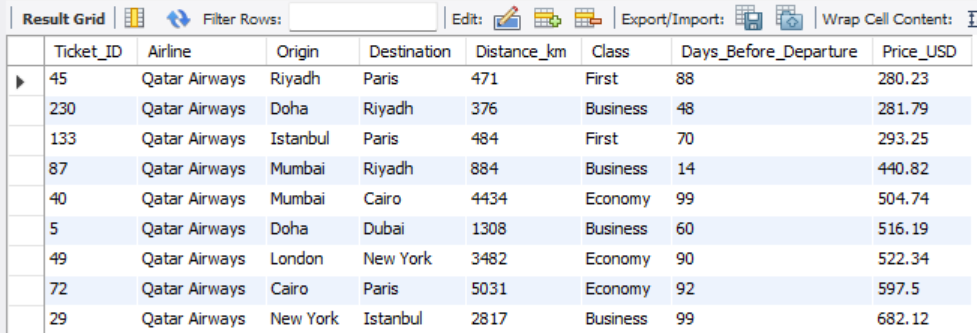
Question 2
To solve this question, I use the combination of “WHERE” and “AND” clauses.
select * from airlines
where
  Class = "Business" and
  days_before_departure <= 30 and
price_usd <= 1000;Question 3
Here, I use the “LIKE” operator with the pattern “%” after “M” to retrieve all words that start with “M”.
select * from airlines
where
  origin like "M%" or
destination like "M%";Question 4
I use the aggregate function in this section to get the average, minimum, and maximum.
select
class,
avg(price_usd),
min(price_usd),
max(price_usd)
from airlines
group by class;Question 5
To solve this question, I use “GROUP BY” and “ORDER BY” clauses to get the airline with the highest number of ticket sales, and “LIMIT” to retrieve only 3 of them.
select
airline,
count(ticket_id) as tiket_terjual,
sum(round(ticket_id * price_usd)) as total_pendapatan
from airlines
group by airline
order by count(ticket_id) desc
limit 3;Question 6
I use a Common Table Expression (CTE) in this section to group tickets based on booking time.
with waktu_pesan as (
select price_usd,
case
  when days_before_departure <=14 then "last_Minute"
  when days_before_departure between 15 and 60 then "Normal"
  when days_before_departure > 60 then "Early Bird"
end as waktu_pesan
from airlines)
select
round(avg(price_usd),2) as average_price,
waktu_pesan
from waktu_pesan
group by waktu_pesan;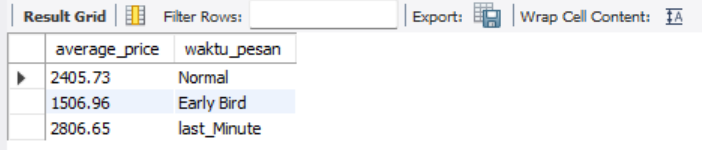
Question 7
To retrieve only Economy class tickets that are priced higher than the average price of Business class tickets, I use a Subquery.
select
Ticket_ID,
Airline,
Origin,
Destination,
Price_USD
from airlines
where
  class = "Economy" and
  price_usd > (
  select
  avg(price_usd)
  from airlines
where class = "Business");Question 8
To solve this question, I use a Window Function to retrieve flight routes where ticket prices are above the overall dataset average.
select
Origin,
Destination,
Price_USD,
row_number() over () as peringkat
from airlines
where price_usd > (
  select avg(price_usd) from airlines)
order by price_usd desc);Question 9
Similar to question 8, I use a Window Function to rank airline tickets by price (from highest to lowest) within each airline.
with peringkat as (
select
airline,
Origin,
Destination,
Price_USD,
dense_rank() over (
partition by airline
order by price_usd desc) as peringkat
from airlines)
select * from peringkat
where peringkat <= 3;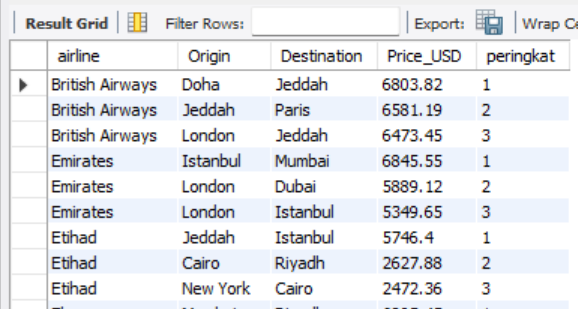
Question 10
I use a Window Function to solve this question to get the difference between each ticket price and the average ticket price.
select
Ticket_ID,
Airline,
Class,
Price_USD,
round(avg(price_usd) over(partition by airline, class),2) as Avg_Price_Per_Airline_Class,
round(price_usd - avg(price_usd) over(partition by airline, class),2) as Price_Difference
from airlines;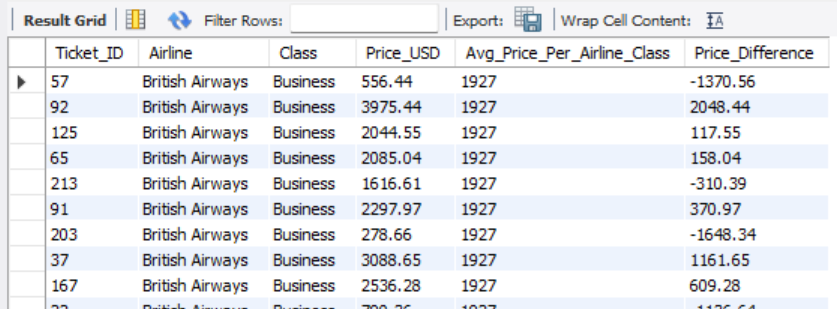
Conclusion
Through these exercises, I applied a variety of SQL techniques, ranging from basic filtering and sorting to more advanced concepts such as subqueries, aggregate functions, Common Table Expressions (CTEs), and window functions. This approach demonstrates my ability to analyze data, extract meaningful insights, and structure queries efficiently. It also reflects my understanding of how different SQL features can be combined to solve real-world data problems.


Club Member Data Cleaning Using SQL: A Structured Approach
Cara Membuat Grafik Quality Control (QC) di Excel


