


After completing my first Python project, a simple To-Do List application, I wanted to challenge myself by building something more interactive and closer to real-world business operations.
This project is a simple cafe cashier system created using Python. The idea came from my daily observations of restaurant employees using POS (Point of Sale) systems and QR code payment applications while serving customers. Seeing how digital cashier systems work in real life motivated me to explore how similar logic could be implemented through programming.
In this project, I focused on practicing Python fundamentals such as dictionaries, while loops, functions, and conditional statements. The application allows users to view menus, place orders, calculate totals automatically, apply discounts and taxes, and generate simple receipts through a command-line interface.
Through this project, I gained a better understanding of program flow, data management, and problem-solving while building a small system that simulates a real cashier experience.
Project Overview
This project is a simple cafe cashier system built using Python and designed to simulate basic Point of Sale (POS) operations in a restaurant or cafe environment. The main purpose of this project was to deepen my understanding of Python logic and improve my ability to work with dictionaries, loops, functions, and user input validation.
Although the application is still terminal-based, this project helped me understand how cashier systems manage transactions and organize order data in real-world scenarios.
Features
- View food and drink menus
- Add multiple items to orders
- Automatically calculate total prices
- Generate simple transaction receipts
- Apply discount for large purchases
- Calculate tax automatically
- Remove or reduce ordered items
- Input validation using try-except
- Interactive command-line interface (CLI)
Tech Stack
- Python
- Command Line Interface (CLI)
- Dictionary Data Structure
- While Loops
- Functions
- VS Code
Project Preview
The application runs through the terminal and simulates a simple cashier system used in cafes or small restaurants.
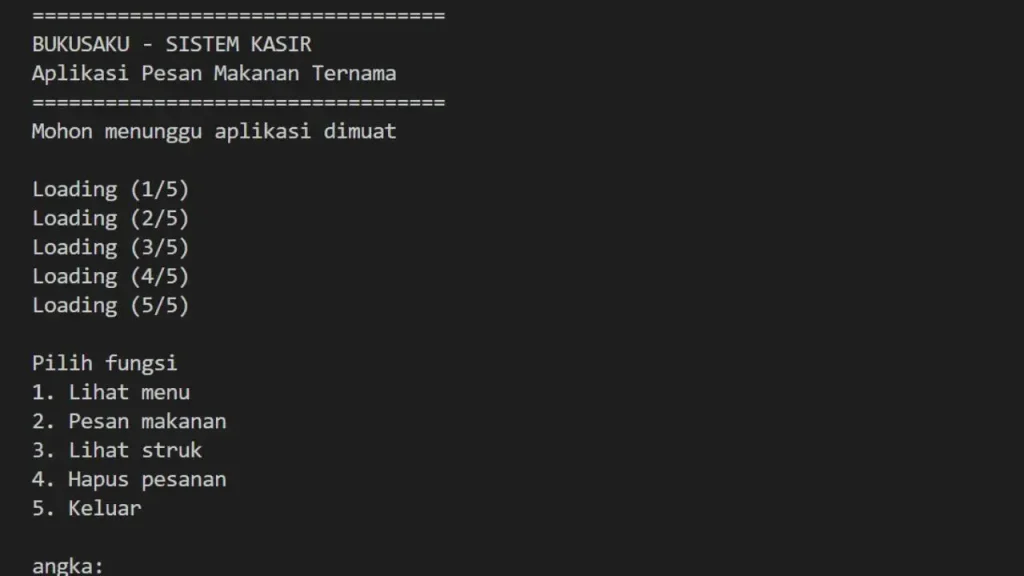
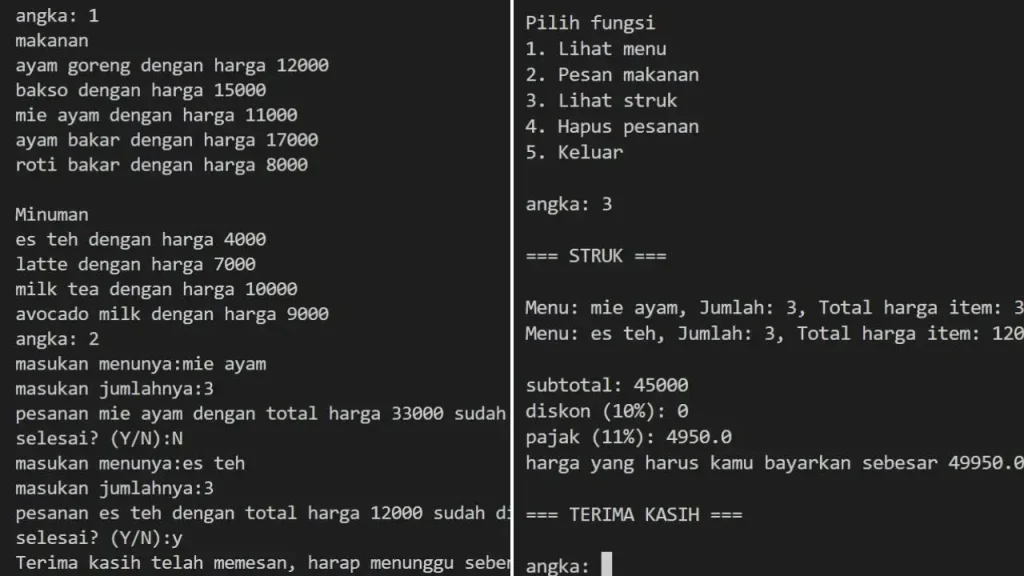
Here is the full code (150+ rows):
#sistem kasir kafe sederhana

# ini bagian list
menu_makanan = {
    "ayam goreng": 12000,
    "bakso": 15000,
    "mie ayam": 11000,
    "ayam bakar": 17000,
    "roti bakar": 8000
}

menu_minuman = {
    "es teh": 4000,
    "latte": 7000,
    "milk tea": 10000,
    "avocado milk": 9000
}

pesanan = []

#define
def awal():
    print("\nPilih fungsi\n"
    "1. Lihat menu\n"
    "2. Pesan makanan\n"
    "3. Lihat struk\n"
    "4. Hapus pesanan\n"
    "5. Keluar\n"
    )

def lihat_menu():
    print("makanan")
    for i,y in menu_makanan.items():
        print(f"{i} dengan harga {y}")
    print("\nMinuman")
    for c,z in menu_minuman.items():
        print(f"{c} dengan harga {z}")

def pesan():
    konfirm = "N"
    while konfirm == "N":
        menu_pesan = input("masukan menunya:").lower()
        jumlah_pesan = int(input("masukan jumlahnya:"))

        # cek apakah menu makanan atau minuman
        if menu_pesan in menu_makanan:
            harga = menu_makanan[menu_pesan]
            total = harga * jumlah_pesan

            pesanan.append({
                "menu": menu_pesan,
                "jumlah": jumlah_pesan,
                "total": total
            })

            print(f"pesanan {menu_pesan} dengan total harga {total} sudah ditambahkan ke list")

        elif menu_pesan in menu_minuman:
            harga = menu_minuman[menu_pesan]
            total = harga * jumlah_pesan

            pesanan.append({
                "menu": menu_pesan,
                "jumlah": jumlah_pesan,
                "total": total
            })

            print(f"pesanan {menu_pesan} dengan total harga {total} sudah ditambahkan ke list")

        else:
            print("Mohon masukan nama menu sesuai dengan buku menu")

        konfirm = input("selesai? (Y/N):").upper()
        while konfirm not in ("Y","N"):
            print("Hanya pilih 'Y' dan 'N' saja")
            konfirm = input("selesai? (Y/N):")

    print("Terima kasih telah memesan, harap menunggu sebentar")

    awal()

def struk():
    subtotal = 0
    diskon = 0

    for item in pesanan:
        Menu = item["menu"]
        Jumlah = item["jumlah"]
        Total = item["total"]

        print(f"Menu: {Menu}, Jumlah: {Jumlah}, Total harga item: {Total}")

    for item in pesanan:
        subtotal += item["total"]

    if subtotal > 50000:
        diskon += subtotal * 0.1

    pajak = (subtotal - diskon) * 0.11
    harga_akhir = subtotal + pajak

    print(f"\nsubtotal: {subtotal}")
    print(f"diskon (10%): {diskon}")
    print(f"pajak (11%): {pajak}")
    print(f"harga yang harus kamu bayarkan sebesar {harga_akhir}")

def hapus_pesanan():
    print("Apakah kamu mau membatalkan/mengurangi item tertentu?")
    konfirm = input("Hapus pesanan? (Y/N):")
    while konfirm.upper() == "Y":
        item_dihapus = input("Masukan barang:")
        jumlah_dihapus = int(input("Masukan jumlah:"))
        for item in pesanan:
            if item["menu"] == item_dihapus:
                item["jumlah"] -= jumlah_dihapus

                print(f"Menu {item_dihapus} telah dikurangi/dihapus sebesar {jumlah_dihapus}")

                if item["jumlah"] < 0:
                    pesanan.remove(item_dihapus)

            else:
                print("Mohon masukan nama menu dan jumlah yang benar")

        konfirm = input("Hapus pesanan? (Y/N):")

    print("Item kamu sudah terhapus")

    awal()

print("==================================")
print("BUKUSAKU - SISTEM KASIR")
print("Aplikasi Pesan Makanan Ternama")
print("==================================")
print("Mohon menunggu aplikasi dimuat\n")
muat_app = 1

while muat_app <= 5:
    print(f"Loading ({muat_app}/5)")
    muat_app +=1
awal()

while True:
    try:
        user_in = int(input("angka: "))

        if user_in == 1:
            lihat_menu()

        elif user_in == 2:
            pesan()

        elif user_in == 3:
            print("\n=== STRUK ===\n")
            struk()
            print("\n=== TERIMA KASIH ===\n")
        elif user_in == 4:
            hapus_pesanan()

        elif user_in == 5:
            print("Terima kasih")
            break

        else:
            print("Mohon masukan angka sesuai menu pilihan")

    except ValueError:
print("Masukkan harus angka!")How It Works
- The user opens the cashier application
- The system displays available menu options
- The user can select food or drinks and input quantities
- Ordered items are stored inside a list using dictionaries
- The system calculates subtotal, discount, and tax automatically
- Users can remove or reduce items from their order
- The application generates a final receipt for payment
Key Python Concepts Used
Dictionary
I used Python dictionaries to store food and drink menus along with their prices.
While Loop
While loops were used to keep the application running interactively until the user chooses to exit.
Functions
Functions helped organize the program into smaller reusable sections such as:
- viewing menus
- ordering items
- printing receipts
- deleting orders
Try-Except
I implemented input validation using try-except to prevent errors when users enter invalid data.
Code Breakdown
1. Menu Data
The project uses Python dictionaries to store food and drink menus along with their prices. Using dictionaries makes it easier to retrieve menu prices based on user input and keeps the data structure simple and organized.
menu_makanan = {
    "ayam goreng": 12000,
    "bakso": 15000,
    "mie ayam": 11000,
    "ayam bakar": 17000,
    "roti bakar": 8000
}

menu_minuman = {
    "es teh": 4000,
    "latte": 7000,
    "milk tea": 10000,
    "avocado milk": 9000
}

pesanan = []2. Order Processing Logic
The ordering system uses a while loop to keep accepting orders until the user decides to stop. Inside the loop, the program:
- receives user input
- checks whether the item exists in the menu
- calculates total prices
- stores order data into a list
This helped me understand how interactive terminal applications manage continuous user input.
def pesan():
    konfirm = "N"
    while konfirm == "N":
        menu_pesan = input("masukan menunya:").lower()
        jumlah_pesan = int(input("masukan jumlahnya:"))

        # cek apakah menu makanan atau minuman
        if menu_pesan in menu_makanan:
            harga = menu_makanan[menu_pesan]
            total = harga * jumlah_pesan

            pesanan.append({
                "menu": menu_pesan,
                "jumlah": jumlah_pesan,
                "total": total
            })

            print(f"pesanan {menu_pesan} dengan total harga {total} sudah ditambahkan ke list")

        elif menu_pesan in menu_minuman:
            harga = menu_minuman[menu_pesan]
            total = harga * jumlah_pesan

            pesanan.append({
                "menu": menu_pesan,
                "jumlah": jumlah_pesan,
                "total": total
            })

            print(f"pesanan {menu_pesan} dengan total harga {total} sudah ditambahkan ke list")

        else:
            print("Mohon masukan nama menu sesuai dengan buku menu")

        konfirm = input("selesai? (Y/N):").upper()
        while konfirm not in ("Y","N"):
            print("Hanya pilih 'Y' dan 'N' saja")
            konfirm = input("selesai? (Y/N):")

    print("Terima kasih telah memesan, harap menunggu sebentar")

awal()3. Remove Order/Items
To make the cashier system more flexible, I added a feature that allows users to remove or reduce items from their orders. This functionality updates the order data dynamically by modifying item quantities inside the order list.
def hapus_pesanan():
    print("Apakah kamu mau membatalkan/mengurangi item tertentu?")
    konfirm = input("Hapus pesanan? (Y/N):")
    while konfirm.upper() == "Y":
        item_dihapus = input("Masukan barang:")
        jumlah_dihapus = int(input("Masukan jumlah:"))
        for item in pesanan:
            if item["menu"] == item_dihapus:
                item["jumlah"] -= jumlah_dihapus

                print(f"Menu {item_dihapus} telah dikurangi/dihapus sebesar {jumlah_dihapus}")

                if item["jumlah"] < 0:
                    pesanan.remove(item_dihapus)

            else:
                print("Mohon masukan nama menu dan jumlah yang benar")

        konfirm = input("Hapus pesanan? (Y/N):")

    print("Item kamu sudah terhapus")

awal()4. Receipt & Transaction Calculation
One of the most important parts of this project is the transaction calculation system, where the application automatically generates a receipt and calculates the final payment amount.
The program calculates:
- subtotal from all ordered items
- discount for purchases above Rp50,000
- tax calculation
- final payment amount
def struk():
    subtotal = 0
    diskon = 0

    for item in pesanan:
        Menu = item["menu"]
        Jumlah = item["jumlah"]
        Total = item["total"]

        print(f"Menu: {Menu}, Jumlah: {Jumlah}, Total harga item: {Total}")

    for item in pesanan:
        subtotal += item["total"]

    if subtotal > 50000:
        diskon += subtotal * 0.1

    pajak = (subtotal - diskon) * 0.11
    harga_akhir = subtotal + pajak

    print(f"\nsubtotal: {subtotal}")
    print(f"diskon (10%): {diskon}")
    print(f"pajak (11%): {pajak}")
print(f"harga yang harus kamu bayarkan sebesar {harga_akhir}") 5. Input Validation
To make the application more stable and user-friendly, I implemented input validation using Python’s try-except feature.
This validation helps prevent the program from crashing when users accidentally enter invalid input, such as text instead of numbers when selecting menu options.
while True:
    try:
        user_in = int(input("angka: "))

        if user_in == 1:
            lihat_menu()

        elif user_in == 2:
            pesan()

        elif user_in == 3:
            print("\n=== STRUK ===\n")
            struk()
            print("\n=== TERIMA KASIH ===\n")
        elif user_in == 4:
            hapus_pesanan()

        elif user_in == 5:
            print("Terima kasih")
            break

        else:
            print("Mohon masukan angka sesuai menu pilihan")

    except ValueError:
print("Masukkan harus angka!")Challenges & What I Learned
Challenges
- Managing program flow between menus and functions
- Handling invalid user input
- Calculating totals, discounts, and taxes correctly
- Updating order quantities dynamically
- Organizing data structures for multiple orders
Limitations
- Data is not stored permanently after the program closes
- The application still uses a terminal-based interface
- No database integration yet
- Payment methods are still simulated manually
What I Learned
- How dictionaries can simplify menu and pricing systems
- Using loops to build interactive applications
- Structuring programs using reusable functions
- Implementing basic cashier system logic
- Improving debugging and problem-solving skills
- Understanding how POS systems work at a basic level
Conclusion
Building this simple cafe cashier system was an exciting step in my Python learning journey. Through this project, I was able to practice not only basic programming concepts, but also how to structure logic for a small real-world application. More importantly, this project improved my problem-solving skills while handling transaction calculations, user input validation, and order management.
Although the application is still simple and terminal-based, this project gave me a better understanding of how cashier and POS systems work behind the scenes. In the future, I plan to continue improving this project by adding more advanced features such as database integration, GUI development, and digital payment simulation.
Changelog
V1.0 – First release (14 May 2026)
- Created a simple cafe cashier system using Python
- Created and release an project article